Now in early access

Your AI manager on WhatsApp.

Stagehand answers your customers on WhatsApp, quotes prices from your own price list and books them into your calendar. It runs on your own PC or server, and you decide what it may do on its own.

Early access by email: no public downloads or self-serve checkout yet. Stagehand connects as a linked device, like WhatsApp Web. It is not the official WhatsApp Business API. Read how it connects, and the risks.

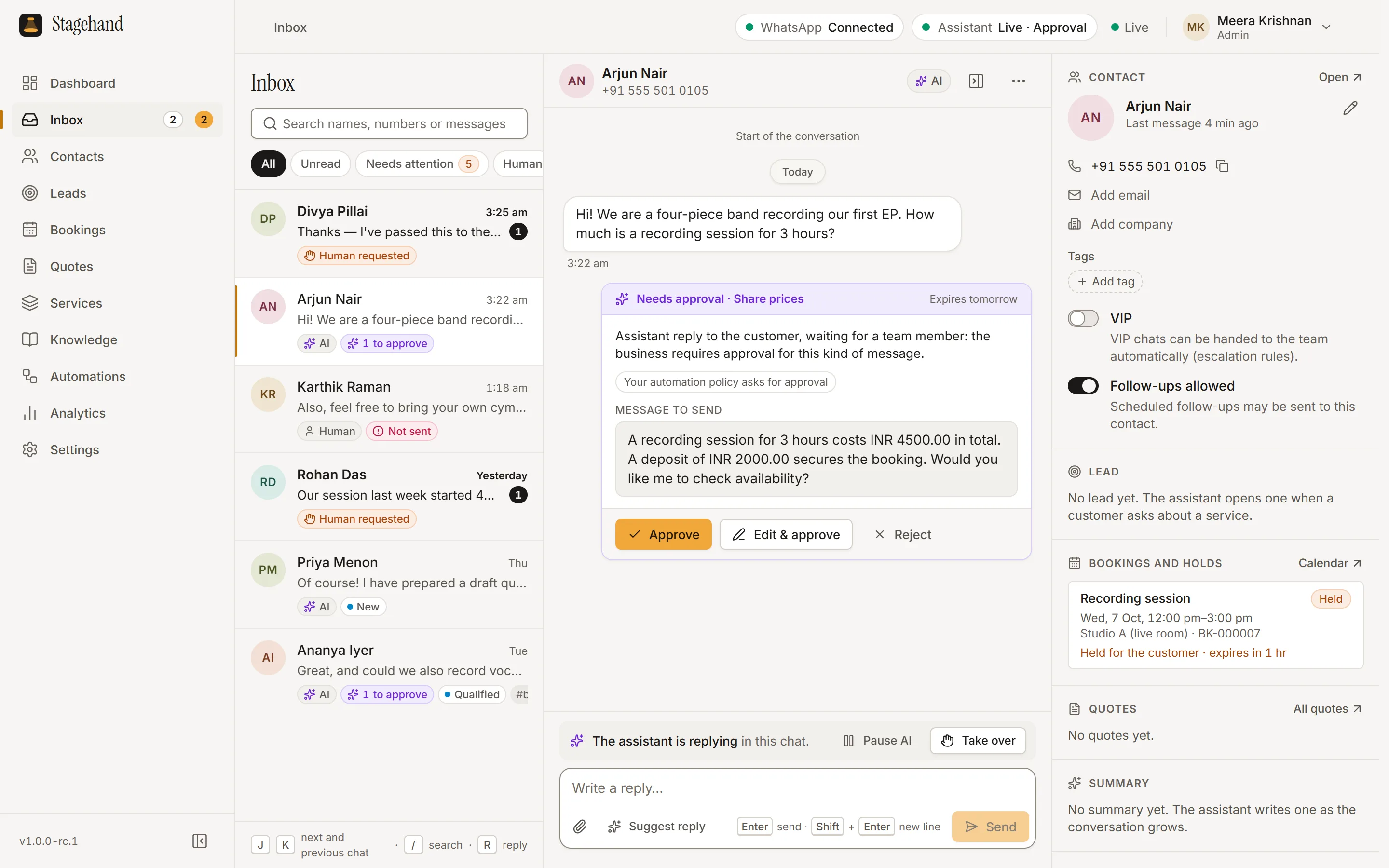
The Stagehand inbox. A new customer asks how much a three-hour recording session costs. The assistant has drafted a reply with the price from the studio’s price list, INR 4500.00 in total with an INR 2000.00 deposit, and it is waiting as a “Needs approval” card with Approve, Edit and approve, and Reject buttons. The contact panel shows a recording session held for the customer.
The real Stagehand inbox in Approval mode, with price replies set to ask first: the assistant has written a price reply from the price list and is waiting for a person to approve it. (By default, amounts that match your price list are sent automatically.) The studio, people and prices are fictional demo data. Open full size: inbox screenshot

Runs on your PC or server

Windows 11 or 10 (64-bit), or Ubuntu or Debian (64-bit, x86-64). It runs as a background service on hardware you control.

Your records stay with you

Conversations, contacts, bookings and quotes are stored on your machine. With Managed AI, what each reply needs passes through to Anthropic, and we do not store it.

You approve what matters

Prices, discounts, bookings, cancellations and refunds can wait for a person before anything is sent.

Who it’s for

For the people behind the show.

Stagehand is built for creative businesses that live on WhatsApp enquiries: rates, dates, availability and quotes, often at night and on weekends.

  • Recording & rehearsal studios

    “Is the live room free on Saturday afternoon?”

  • Artists

    “Are you available for a private event in December?”

  • Artist managers

    “What is the fee for a 45-minute set?”

  • Producers

    “How much to produce and mix one song?”

  • DJs

    “Can you play our sangeet on the 14th?”

  • Event venues

    “Do you have the hall for 200 guests in March?”

  • Photographers

    “What does a pre-wedding shoot cost?”

  • Videographers

    “Can you shoot a music video next month?”

  • Creative agencies

    “Can you send us a quote for a campaign shoot?”

Examples of the questions customers send. Stagehand answers from your own services, prices and policies.

How it works

From install to first reply, on your terms.

  1. Step 1: Install

    Run the installer on a Windows 11 or 10 PC, or install the .deb package or tarball on a 64-bit (x86-64) Ubuntu or Debian computer or server, then enter your license key. Stagehand runs as a background service; you work in the desktop app or the web dashboard.

  2. Step 2: Scan the WhatsApp QR

    Link your business number as a linked device, the same way WhatsApp Web works. Your phone keeps working as usual.

  3. Step 3: Switch on your plan’s AI

    Your plan decides which AI you use: Stagehand Managed AI, powered by Claude from Anthropic (Starter, Growth and Pro), or Local AI with Ollama on the same PC (the Local plan). Compare them.

  4. Step 4: Go live when you’re ready

    Add your services, prices and policies, choose what the assistant may do, and switch it on. Nothing is sent to customers until you do.

Features

Everything the front desk does, in one place.

Every plan includes every feature. The assistant works inside the same inbox, calendar and CRM your team uses. Verified prices, approvals, escalation and human takeover are under Safety and control.

Conversations

  • Shared inbox

    Every WhatsApp chat in one inbox your whole team works from.

  • Knowledge base

    Your FAQs, policies and details, which the AI draws on to answer.

  • Follow-ups

    Reminders with quiet hours and opt-out, only to people already talking to you.

Sales and bookings

  • Quotes with PDF

    Build quotes from your services and send them as PDFs.

  • Bookings

    Holds, approvals and double-booking protection for your rooms and people.

  • CRM

    Contacts, tags, notes and a leads pipeline, next to every chat.

Team and records

  • Team accounts

    Unlimited team members, with roles that control who can do what.

  • Analytics

    Enquiries, leads, bookings, escalations and response times, calculated on your own computer.

  • Backups

    Back up your data and restore it when you need to.

  • Desktop and web

    The Stagehand desktop app on Windows, and a web dashboard.

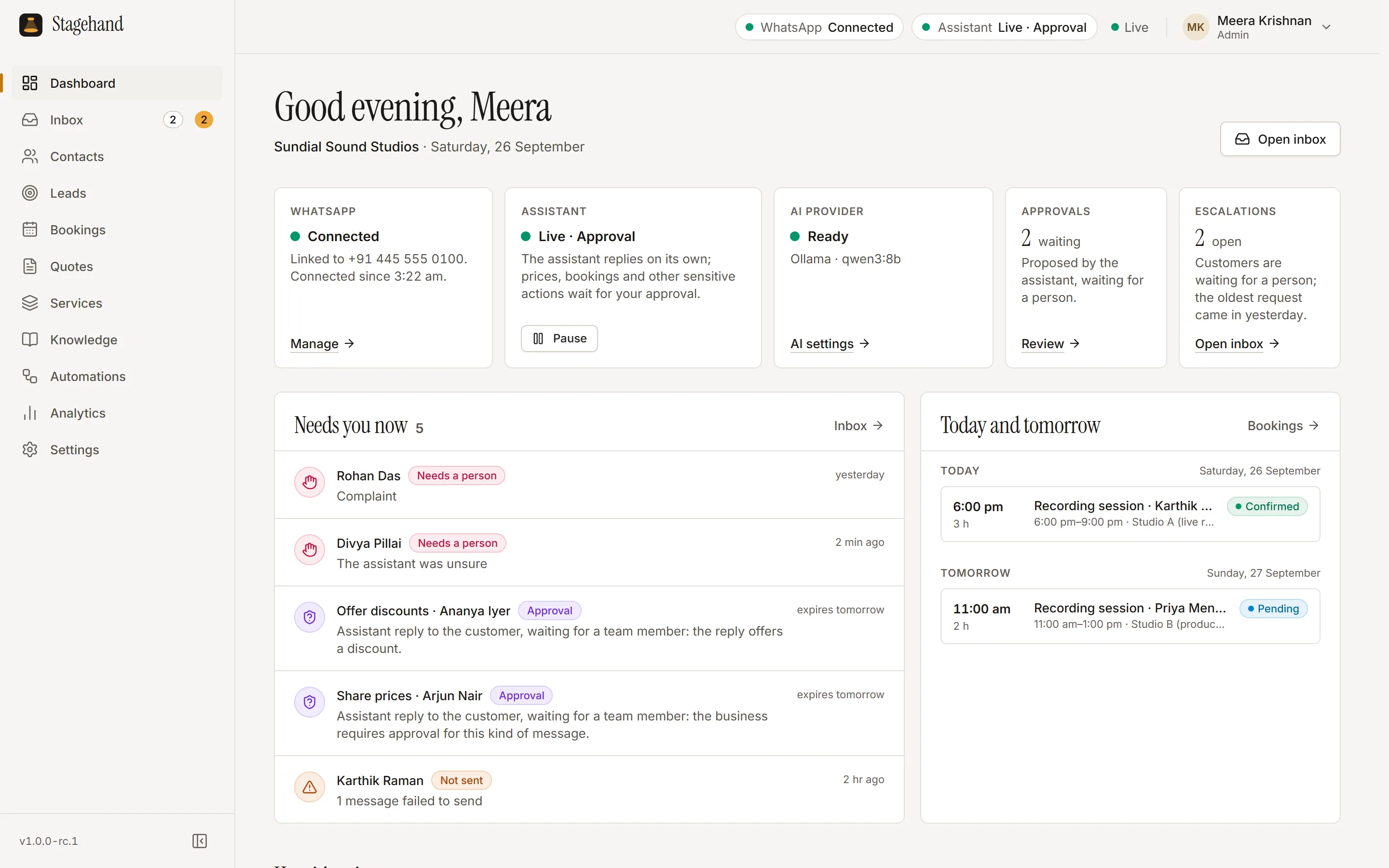
The Stagehand dashboard: WhatsApp connected, the assistant live in Approval mode, two approvals and two escalations waiting in a “Needs you now” list, and today’s and tomorrow’s recording sessions.
Dashboard: what needs a person now, and what is booked today and tomorrow. Open full size: dashboard screenshot
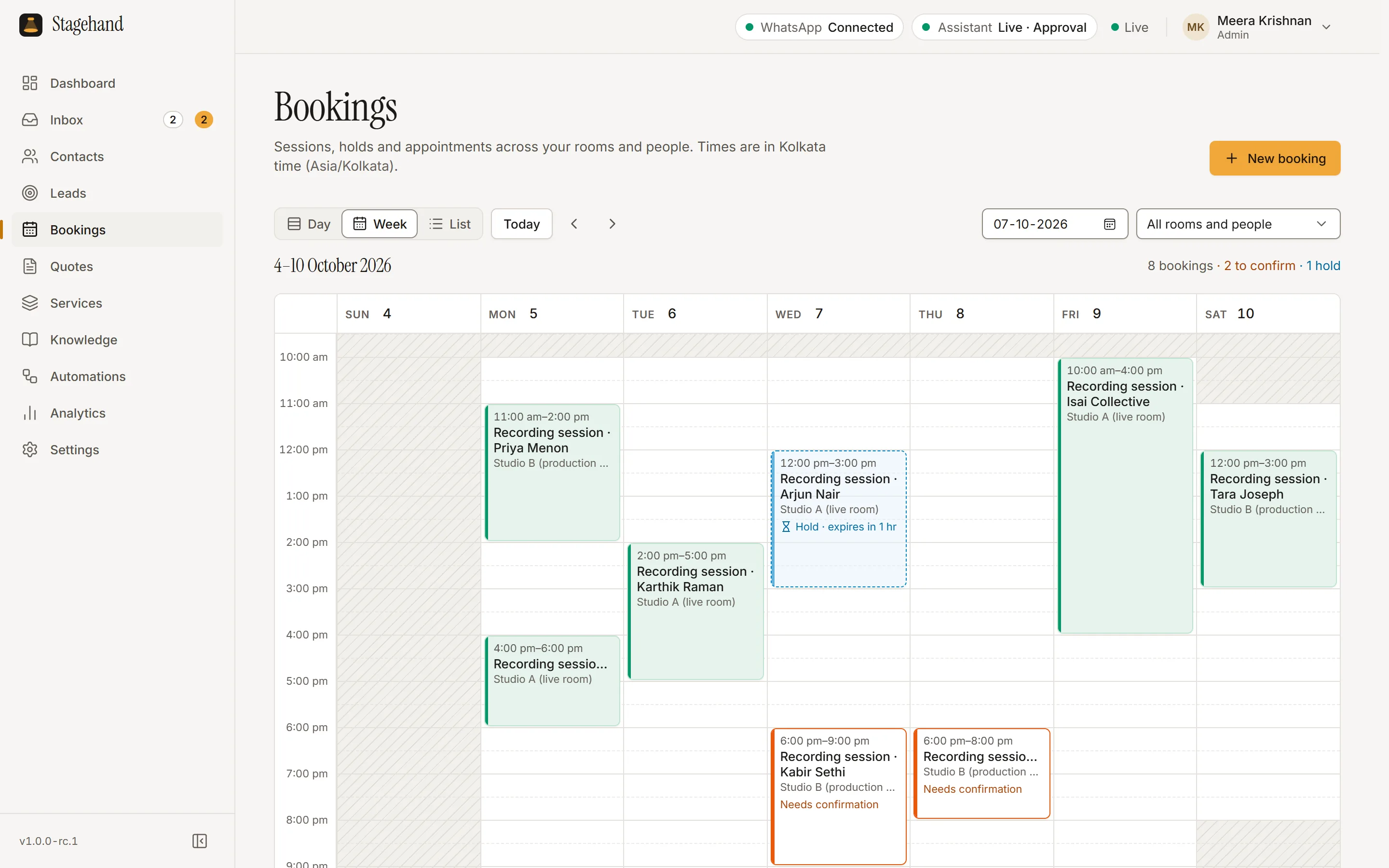
The Stagehand bookings calendar, week view for 4 to 10 October: recording sessions across two studio rooms, including confirmed sessions, one hold that expires in an hour, and two bookings waiting for confirmation.
Bookings: confirmed sessions, holds and requests waiting for confirmation, per room. Open full size: bookings screenshot

Safety and control

The AI proposes. You decide.

AI can make mistakes, so Stagehand is built around control: approvals, price checks and limits are enforced by the software, not left to the AI’s judgement.

Copilot

The AI drafts every reply. A person sends it.

Approval

Recommended start

Routine replies go out; sensitive actions wait for a person to approve.

Autopilot

Only the actions you allow run automatically.

  • Verified prices

    Every amount the AI sends is checked against your own price list. If it doesn’t match, the message is held for your approval.

  • Approvals, per action

    For prices, discounts, quotes, bookings, cancellations, payment links, refunds, media, follow-ups, choose whether the assistant acts on its own, asks first, or never does it.

  • Escalation to a person

    Stagehand looks for words and phrases you choose (English ones such as “complaint”, “lawyer”, “refund” and “talk to a human” are preset; add the words your customers use in their own languages) and hands those chats to your team. The assistant can also hand a chat over when it is unsure.

  • Human takeover

    Take over any chat from the inbox or by replying from your phone, and hand it back to the AI when you’re done.

  • Audit log

    Sign-ins, approvals and setting changes are recorded, so you can see who did what.

  • Never poses as a person

    The assistant is instructed never to claim to be human and to say it is an AI whenever a customer asks. With Managed AI, you also tell each customer at the start of a conversation that an AI may reply.

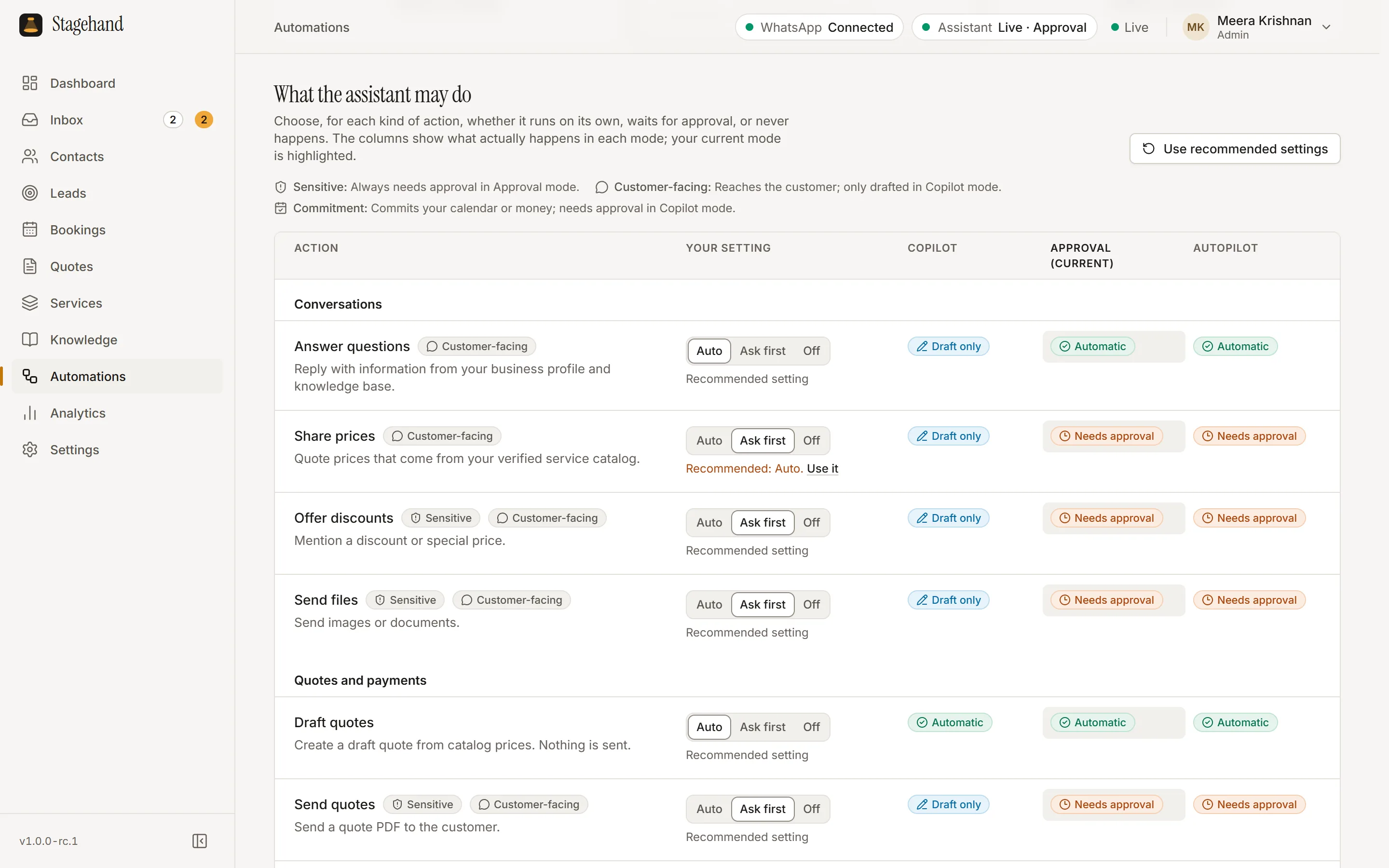
The Stagehand automations page, “What the assistant may do”: a table of actions such as answer questions, share prices, offer discounts, send files, draft quotes and send quotes, each set to Auto, Ask first or Off, with columns showing what happens in Copilot, Approval and Autopilot mode.
Automations: one setting per action, and a preview of what each mode does with it. Open full size: automations screenshot

AI options

Managed AI or Local AI. Your call.

Both run the same Stagehand, with the same rules and approvals. They differ in reply quality, cost per reply and where the conversation text goes.

Stagehand Managed AI

Powered by Claude from Anthropic, through Gravaxis. The better choice for sales conversations and bookings.

Reply quality
Higher. Better with nuanced questions and longer conversations.
Cost
AI replies included each month: 500 on Starter, 1,500 on Growth and 4,000 on Pro. Extra replies are ₹10 each, plus GST. A fair-use limit applies (see the terms).
Where the text goes
For each reply, the conversation and the details the AI looks up, such as your prices and the customer’s name, go through Gravaxis’s servers to Anthropic, a US company, which processes them in the United States and other countries where Anthropic runs its models. We do not store them; under its current published policy, Anthropic deletes them within 30 days unless they are flagged for misuse.
Hardware
The AI runs remotely, so your PC only needs to run Stagehand itself.
Plans
Starter, Growth, Pro

Local AI

Runs Ollama on the same PC as Stagehand. The private, low-cost choice.

Reply quality
Basic and slower. Keep approvals on and check its drafts more often.
Cost
Free per reply. The Local plan includes unlimited AI replies.
Where the text goes
It stays on your PC. The AI runs there, so no conversation text is sent to an AI service.
Hardware
A capable PC: 16 GB RAM recommended, and a GPU helps. Stagehand checks your hardware and recommends a model.
Setup
You install Ollama, a free third-party program, and Stagehand helps you download an open model (Apache-2.0 license) from ollama.com.
Plans
Local

Want both? The Hybrid add-on uses Managed AI, with Local AI answering when Managed AI is unavailable or paused by a usage limit (price on request). Premium AI writes managed replies with the most capable Claude model we offer, currently Claude Opus 5.5, and costs the plan price again (2× in total). Both add-ons are for managed plans.

Pricing

Monthly plans in rupees. Every feature included.

Pick the AI and the volume that fit. Prices are in Indian rupees per month and exclude 18% GST.

Compare plans in detail

Local

Local AI

₹1,999/ month

+ 18% GST · billed monthly

Unlimited AI replies

Runs on your PC: 16 GB RAM recommended

The AI runs on your own PC, so no conversation text goes to an AI service, and there is no charge per reply. Replies are basic and slower, so keep approvals on.

Starter

Managed AI

₹4,999/ month

+ 18% GST · billed monthly

500 AI replies / month

Extra AI replies ₹10 each + GST (₹11.80)

Managed AI for a business getting its first WhatsApp enquiries under control.

Growth

Managed AI

₹14,999/ month

+ 18% GST · billed monthly

1,500 AI replies / month

Extra AI replies ₹10 each + GST (₹11.80)

Managed AI for a busy inbox with new enquiries every day.

Pro

Managed AI

₹38,999/ month

+ 18% GST · billed monthly

4,000 AI replies / month

Extra AI replies ₹10 each + GST (₹11.80)

Managed AI for high-volume businesses that answer customers all day.

Every plan includes

  • Every feature
  • Unlimited team members
  • 1 WhatsApp number
  • 1 installation on one machine
  • Desktop app and web dashboard
  • Windows or Linux
  • Updates while subscribed
  • Email support

Add-ons

  • Premium AI · Plan price again (2× in total)

    Managed AI replies written by the most capable Claude model we offer (currently Claude Opus 5.5), for the most demanding conversations. For Starter, Growth and Pro.

  • Hybrid · Price on request

    Managed AI, with Local AI on your own PC answering when Managed AI is unavailable (for example during an outage) or paused for the month by a usage limit. For Starter, Growth and Pro.

Extra AI replies on managed plans are ₹10 each, plus GST.

Prices are in Indian rupees per month and exclude 18% GST. Billed monthly; renews each month until you cancel. Cancel any time, effective at the end of the paid period. Cancellation and refunds

Transparency

How Stagehand connects to WhatsApp, and the risks.

We would rather you hear this from us before you decide.

It is an unofficial connection

Stagehand links to your WhatsApp number as a linked device, the same way WhatsApp Web does, when you scan a QR code with your phone. It is not the official WhatsApp Business API, and it is not made, approved or supported by WhatsApp or Meta.

It can break

WhatsApp changes its apps without notice. When it does, Stagehand may stop sending or receiving messages until it is fixed. That can take days or weeks, and sometimes a fix is not possible.

Your number could be restricted or banned

WhatsApp’s terms do not allow unofficial apps or automated messaging without WhatsApp’s permission, and Stagehand does not have that permission. WhatsApp may restrict or permanently ban the connected number without warning, including the app on your phone, and we cannot prevent or reverse that.

No guarantee it keeps working

We cannot promise that WhatsApp will keep allowing linked-device connections. Using Stagehand does not give you WhatsApp’s permission.

How Stagehand reduces the risk

  • Only people who contacted you

    It only messages people who contacted your business first. No bulk messaging, broadcasts, cold outreach or contact scraping.

  • Reply limits

    It limits how many replies each chat gets per hour, and answers several messages from a customer together instead of one by one.

  • You stay in control

    It starts switched off. Copilot and Approval modes keep a person in the loop, and replying from your phone hands the chat back to you.

  • Careful follow-ups

    Only to people already talking to you, with quiet hours, and never again once someone opts out.

What we recommend

  1. Keep another way for customers to reach you, such as a phone number or email, in case WhatsApp access is interrupted.
  2. Start in Copilot or Approval mode and watch how customers respond.
  3. Only message people who contacted you, and respect opt-outs.
  4. Run Stagehand on an office PC or server on your own internet connection. You can use a rented cloud server, but WhatsApp is more likely to restrict numbers connected from data centres.
  5. If WhatsApp shows you a warning, pause the assistant and email us.

More in our WhatsApp connection disclosure and terms.

FAQ

Questions, answered plainly.

Something else? Email info@gravaxis.in. We aim to reply within 2 working days.

Is this the official WhatsApp Business API?

No. Stagehand connects to your WhatsApp number as a linked device, the same way WhatsApp Web does, after you scan a QR code. It is not the official WhatsApp Business API. Stagehand AI is not affiliated with, endorsed by or sponsored by WhatsApp or Meta.

Could WhatsApp restrict or ban my number?

It is possible. WhatsApp’s terms do not allow unofficial apps or automated messaging without its permission, so WhatsApp may restrict or permanently ban the connected number, and a ban applies to the whole account, including on your phone. The connection can also stop working when WhatsApp changes. Stagehand reduces the risk by only messaging people who contacted you first, limiting how many replies each chat gets and never sending bulk messages, but it cannot remove the risk. Keep another way for customers to reach you, such as a phone number or email. Read the details.

Does Stagehand send bulk messages or cold outreach?

No. It replies to customers who message your business. There is no bulk messaging, broadcasting, cold outreach or contact scraping. Follow-ups go only to people already talking to you, need your approval by default, respect quiet hours, and stop when someone opts out.

Where is my data stored?

On your machine. Stagehand is self-hosted: conversations, contacts, bookings and quotes are stored on your Windows PC or Linux server. With Managed AI, the conversation and the details the AI looks up for each reply go through Gravaxis’s servers to Anthropic, a US company, to write it; we do not store them, and under its current published policy Anthropic deletes them within 30 days unless they are flagged for misuse. With Local AI, the AI runs on your PC too, so no conversation text is sent to an AI service. License checks send your computer’s name and technical details, never your messages. Privacy policy.

Managed AI or Local AI: which should I choose?

Managed AI, powered by Claude from Anthropic, writes better replies; plans include a number of AI replies each month. Local AI runs Ollama on your own PC: replies are free and no conversation text is sent to an AI service, but they are basic and slower, and it needs a capable PC. Compare them.

What kind of PC do I need for Local AI?

16 GB of RAM recommended, and a GPU helps. Stagehand checks your hardware and recommends a model.

Will my customers know they are talking to an AI?

The assistant is instructed never to claim to be human and to say it is an AI whenever a customer asks, and you can take over any chat yourself at any time. With Managed AI, our terms and Anthropic’s Usage Policy also require you to tell each customer, at the start of each conversation, that an AI assistant may reply; Stagehand does not add that notice for you yet. With Local AI we recommend it, and the law may require it.

What happens if the AI gets something wrong?

AI can make mistakes, so Stagehand is built around control. Every amount the AI sends is checked against your price list and held for approval if it doesn’t match. Sensitive actions, such as discounts, bookings, cancellations and refunds, can wait for a person. Stagehand looks for words and phrases you choose (English ones such as “complaint”, “lawyer”, “refund” and “talk to a human” are preset; add the words your customers use in their own languages) and hands those chats to your team. The assistant can also hand a chat over when it is unsure. Keep approvals on for sensitive actions.

Can my team use it?

Yes. Every plan includes unlimited team members with roles, a shared inbox, and takeover of any chat.

How many WhatsApp numbers and computers does a plan cover?

One WhatsApp number, and the Stagehand service on one computer. Your team can open the dashboard or the desktop app from any computer. To move Stagehand to a new computer, choose “Deactivate this computer” in Settings › Subscription, then activate the new one. If the old computer is lost or broken, email info@gravaxis.in and we will move the license.

Does my computer need to stay on?

Yes. Stagehand answers only while the computer running it is on, awake and connected to the internet. Messages that arrive while it is off still reach your phone. When Stagehand starts again, it can check for missed messages: you choose whether the assistant answers them (with a short note about the delay), only imports them, or asks you first.

Does Stagehand need the internet?

Yes: for WhatsApp, for Managed AI, and to check the license about every 12 hours. If the computer is offline, the license keeps working for up to 7 days; after that the AI assistant pauses until it can check again. Your inbox and data keep working.

Which systems does it run on?

Windows 11 (recommended) or Windows 10, 64-bit, with an installer, a background service and the Stagehand desktop app. Windows 10 is supported on a best-effort basis, because Microsoft no longer supports it. Or Linux: Ubuntu or Debian, 64-bit (x86-64), with a .deb package or a tarball. There is a web dashboard too.

How does billing work?

Plans are billed monthly in Indian rupees, plus 18% GST, with a GST tax invoice for every payment. Your subscription renews each month until you cancel, and you can cancel at any time: cancellation takes effect at the end of the period you have paid for. We do not refund partial periods except as our refund policy and the law provide, and duplicate or incorrect charges are refunded to your original payment method within 5–7 working days after we confirm the error. Cancellation and refunds.

How do I get Stagehand?

Stagehand is in early access. Request access by email and tell us about your business. After payment, your license key arrives by email, normally within 1 working day of payment, and we send you the installer and setup help by email.